Supermarkets
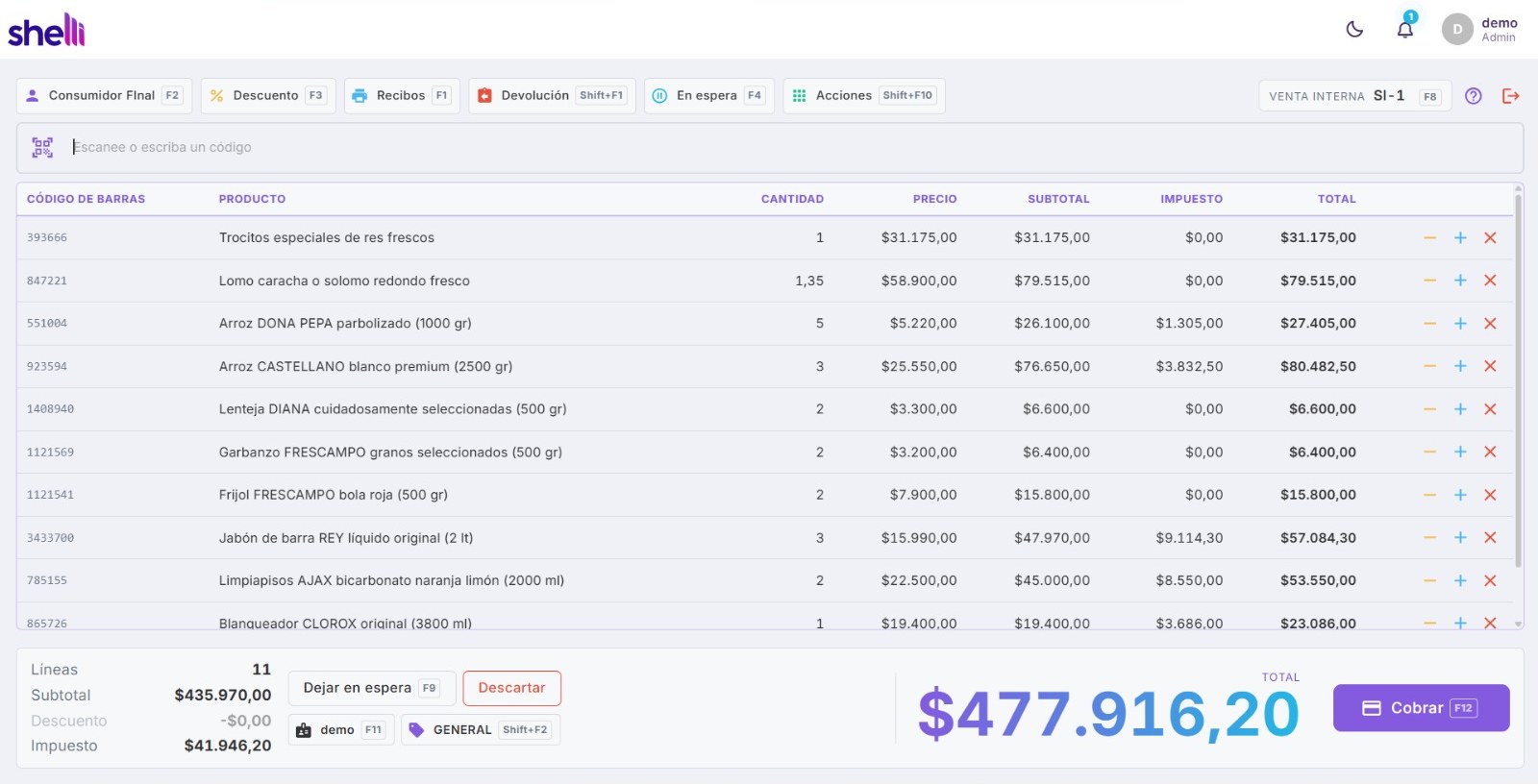
Scanner and scale at the lane, weighed products, lots and expiry dates, and a queue that moves because the till is worked with both hands on the keyboard.

Point of sale and business management, from Draf IT
Shelli puts the till, the stock, the products, the reporting and the day-to-day running of a business in one place. One shop or twenty, a counter or a phone, and the same system underneath the whole way.
30 days free. No card, and nothing to cancel.
Point of sale, stock, invoicing, reporting, several shops
A business that outgrows its software pays twice: once for the new one, and once more in the months nobody can find anything. Shelli is built so that does not happen.
A till, your products and your stock. Enough to open tomorrow, and nothing you have to learn before you can sell.
More devices, accounting, payroll, the advanced counter, your own reports. Each one turns on where it stands, without moving anything you have already set up.
A second shop, then a region, then a chain. The same products, the same reports and the same people who already know how to use it.
One selling engine, set up for the trade. The till changes; the stock, the documents and the reporting underneath do not.
Scanner and scale at the lane, weighed products, lots and expiry dates, and a queue that moves because the till is worked with both hands on the keyboard.
Variants, cases and packs, serial numbers, price lists per customer, and stock that agrees across every branch you run.
Tables on a floor plan, courses and split bills, pre-bills before the money, and orders that reach the right station.
Made for goods that do not arrive with a barcode. Several scales at once, weighed lines, and label codes that carry the weight or the price inside them.
Each shop runs its own till and its own stock, and the business reads them together. Opening the second one changes nothing about the first.
Load a phone with stock, send somebody out with it, sell on the round and bring the day back to the shop.
No installer to chase, no engineer to book, and nothing to migrate before you can try it.
Your company, your shop, and the country it trades in. That last one sets the currency, the taxes and the documents from the start.
Install Shelli on the counter, or Shelli Mini on a phone, and approve it from your account. It carries its licence from then on, offline included.
Bring your products in, set your prices, and open the till. Add branches whenever you open them.
Not modules to buy one at a time. This is what the product is.
Four screen layouts over one selling engine — supermarket, restaurant, lane and a simple till. Quotes, credit, layaway and returns against the original document.
Issued through the provider your country mandates, with the numbering kept straight. Buy documents ahead and spend them as you sell.
Lots, serials, expiry, transfers between warehouses, cost and margin, and a minimum that tells you before you run out.
Card, PSE, Nequi and Bancolombia through Bold, and more rails on the way. The customer scans and pays from their phone; the till waits for the confirmation and closes the sale itself, so nobody types an amount twice.
Take a card on the terminal you already have, recorded against the sale as its own tender. Cash, card, transfer and account in one ticket.
Ask a shop for today, yesterday or the month and read it from wherever you are. Sales, tax by rate, documents, shifts, and what sold most.
One company, as many shops as you open. Each with its own licence, its own devices and its own numbering, all on one account.
A till that loses its connection goes on trading on the licence it already holds. A shop does not close because a line did.
Orders on a screen at the station that cooks them, instead of a printer nobody can hear over service.
Two ways to run it, on the same catalogue and the same prices as the till: ordering for a restaurant, where the queue orders and pays for itself, and self-checkout for a shop, where a customer scans their own basket and pays.
Set up any tablet or PC in the shop as a price point on your own network. A customer scans a barcode and reads the price themselves, off the same catalogue the till sells from.
It comes with both applications, it runs on the device's own intelligence, and it is not charged per question.
Say what you are adding — a product, a customer, a supplier's invoice — and it writes it into the fields. You check it and save.
How to issue a credit note, where the price list lives, why a document is held. It answers about this application, not about the internet.
Ask out loud while your hands are busy, or type it. It does the thing rather than only explaining it.
Describe a dish or a product and it draws a picture for the menu, the kiosk screen or the price tag.
Shelli EnterpriseCount the till at eight, order from the supplier on Friday, call a customer back after lunch. It keeps the appointment.
Shelli EnterpriseThe work happens on the machine in front of you, so it also answers with the shop's internet down. What a device can do depends on the device.
The assistant uses the intelligence built into the device, so what it can do is decided there rather than by us.
We do not limit how much you use it and we do not charge per question. The device can: a phone that is hot, low on battery or managed by a company may answer more slowly or stop until it cools down. On Android the system's assistant answers better in English than in Spanish.
One shop, one device, and everything on it. It keeps selling with no signal at all, and the day it goes it hands the shop over as a file.
Nothing here has to be decided now. Every rung is the same system with more of it switched on, and you climb when the business does.
A till, or several, all talking to the shop it stands in.
Each one keeps its own stock and its own day, and the company reads all of them.
Products, prices and offers set once for everybody, stock moved between shops, and the whole company on one report.
Head office sets the rules and each location still runs its own floor.
The shop is the middle of it. Everything else is something you switch on when there is a reason to, and it is already talking to the rest.
Run one, or all three. Every shop you open lives under the same company, and the bill arrives once.
For a shop with a counter
For a shop with a counter. Several tills, kitchen screens and customer displays, stock across warehouses, and the reporting to go with it.
Basic, Pro, and an edition for each kind of business: restaurants, supermarkets, fashion, tech, appointments and more. See the editions
From 19.00 USD a month
Plans and pricesFor a shop that fits in a pocket
For a shop that fits in a pocket. One phone, one branch, and the same documents and reports the big till files.
From 15.00 USD a month
Plans and pricesFor a restaurant that takes orders online
A digital menu your customers open on their phone, with orders that reach the kitchen. Sold on its own site, and its own way.
Visit the siteNexus is where you deal with us: what you hold, what you pay, and what your shops are doing today.
Your plan, your shops, your devices and your bills, in one account however many companies you run.
Which tills are paired, which are working, and what is left of the devices you have paid for.
Ask a shop for its figures and read them here, without standing in it.
Nexus is not a copy of your shop. When you ask for a report it asks the shop, shows you the answer and keeps it for minutes rather than for good - there is no table here holding your sales. What we do keep is what we sold you: your account, your licences and your bills.
These are bought on top of a plan rather than being in it, so a business that does not need them is not paying for them.
Nightly encrypted off-site copy of the store database. Only the customer can decrypt it. Priced per store.
Priced per shop. Read the whole list on the pricing page.
Prices, taxes and documents follow the country the shop is in, not the one we are in. Add a market and it is a row of data, not a new release.
A till that loses its line goes on trading on the licence it already holds. A shop does not close because a connection did.
Ask a shop for its day and it answers from its own database, encrypted end to end. We show it and keep nothing.
Any of them. Currency, taxes and document rules come from the country each shop is in, and they are data rather than a build — so a market we have not set a local price in is quoted in dollars rather than turned away. Electronic invoicing needs a provider for that country, and Colombia is connected today.
The till keeps selling. It holds its own licence and its own database, so sales, printing and stock all carry on without reaching us, and it catches up when the line comes back.
No. Shelli runs on an ordinary Windows computer, and Shelli Mini on an Android or iPhone. We suggest 8 GB of memory on Windows and 4 GB on Android. Scanners, scales and receipt printers work if you have them, and none of them is required to start.
It comes with both applications and it uses the intelligence built into the device. On an iPhone 15 Pro or newer, an iPad or Mac with an Apple chip, or a Copilot+ PC it runs at full speed. On an ordinary Windows PC it runs more slowly, and on Android tills that carry no assistant of their own we install a smaller model. Nothing else on the till depends on it: if a device cannot run the assistant, it still sells, invoices and prints exactly the same.
Yes, where your country requires them. Shelli issues through the provider that country mandates and keeps your numbering in order. You buy documents in blocks and spend them as you sell, so there is no monthly bill for months you were closed.
Yes. Charge on the terminal you already have and record it against the sale as its own tender. You can also take QR payments, where the customer scans and pays from their phone and the till closes the sale when the payment confirms.
The trial is 30 days, needs no card and cancels itself by simply ending. On a paid plan you can change plan when the shop changes, and your trading history stays in your own database on your own machine.
The installer for Windows, macOS or Linux, and Shelli Mini for the phone. Free to try for 30 days.
30 days of Basic, and nothing to cancel if you walk away.